Educational only. This guide explains general good practice for fixing mistakes in small-business records. It is not accounting or tax advice. If a mistake affects a tax return or a report you already gave someone, talk to a professional. Examples are fictional.
Short answer
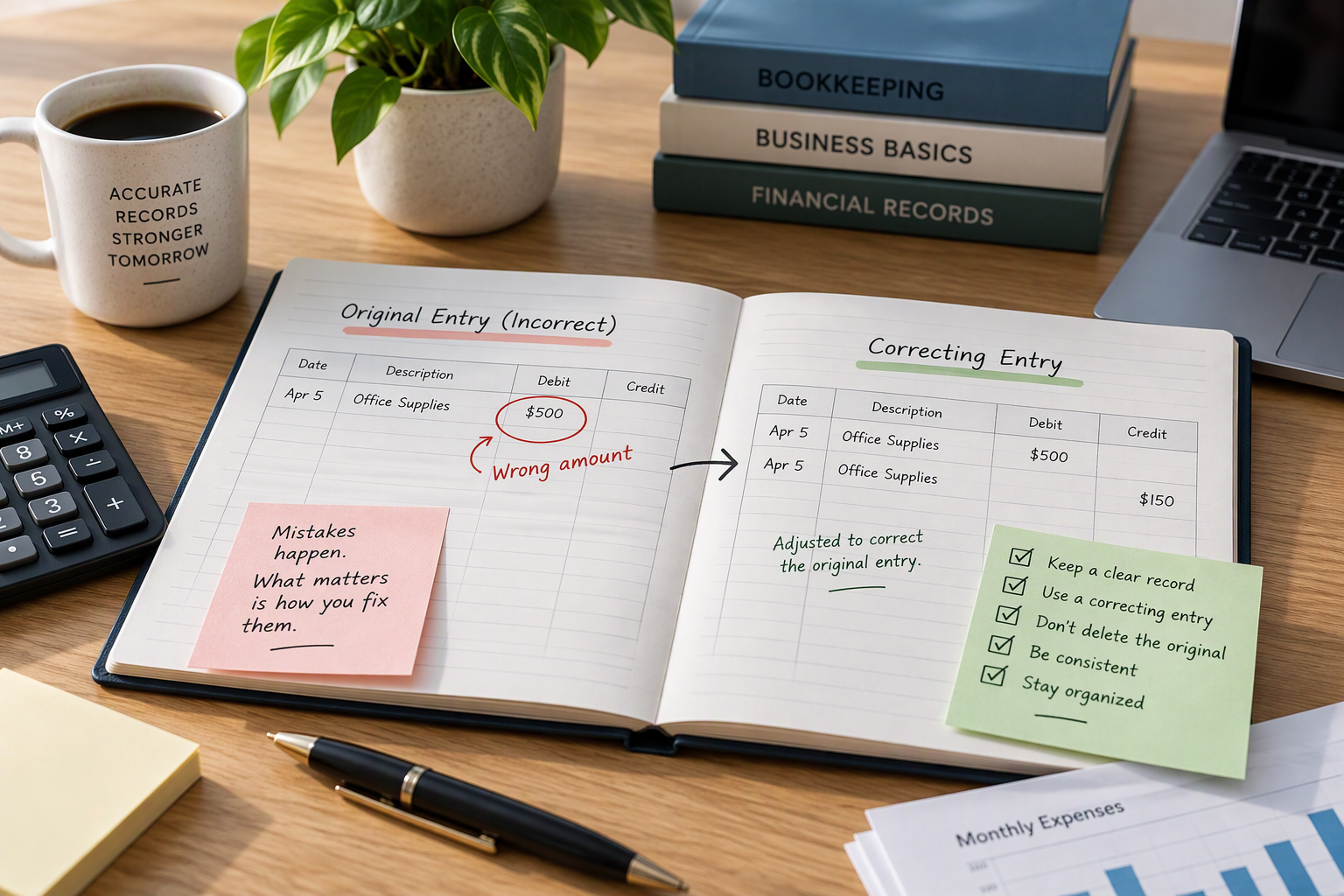
Fix a bookkeeping error by recording a correction, not by deleting or overwriting the original. Keep the wrong entry visible, add a correcting entry with the date, the amount, and a short reason, and check the result against your bank statement. Anyone reading the records later, including you, can then see what happened and why.
Why not just edit the number?
Overwriting a figure makes the record look clean, but it erases the history. If the books later disagree with a bank statement, an invoice, or a report you sent a lender, nobody can tell whether the difference is a new error or an old correction. A visible correction keeps a trail:
- what was recorded originally,
- what it should have been,
- when and why it was changed.
That trail is sometimes called an audit trail. You do not need special software for it; a note column in a spreadsheet is enough.
How errors are usually found
The monthly bank reconciliation catches most of them. IRS Publication 583 suggests reconciling your checking account each month and making sure your bank statement, your checkbook, and your books agree. When they do not, the difference points to an error somewhere: in your records, or occasionally in the bank’s.
Three common errors and how to correct them
The three mistakes below are hypothetical. They use Ortiz Studio’s fictional April 2026 records, where the correct expense total is $700.
1. A transposed number
Maya recorded the Inkberry Print Shop receipt as $56 instead of $65. The bank statement shows $65.
| Date | Description | Amount | Note |
|---|---|---|---|
| Apr 12 | Inkberry Print Shop, supplies | $56 | Original entry |
| Apr 30 | Correction: Inkberry Print Shop, supplies | $9 | Original entered as $56; receipt and statement show $65 |
Total for the purchase: $56 + $9 = $65, which now matches the receipt and the statement.
2. A duplicate entry
The Bramblewire Internet bill ($120) was entered twice, once from the email bill and once from the statement.
| Date | Description | Amount | Note |
|---|---|---|---|
| Apr 8 | Bramblewire Internet | $120 | Original entry |
| Apr 8 | Bramblewire Internet | $120 | Duplicate |
| Apr 30 | Reversal of duplicate: Bramblewire Internet | −$120 | Same bill entered twice; one payment on the statement |
Net effect: $120 + $120 − $120 = $120, the single payment on the statement.
3. The wrong category
The Plumcast Ads campaign ($150) was recorded under “Supplies” instead of “Marketing.”
| Date | Description | Category | Amount | Note |
|---|---|---|---|---|
| Apr 15 | Plumcast Ads | Supplies | $150 | Original entry |
| Apr 30 | Reclassify Plumcast Ads | Supplies | −$150 | Wrong category |
| Apr 30 | Reclassify Plumcast Ads | Marketing | $150 | Moved from Supplies |
Total expenses do not change; only the category totals do. Once all three corrections are in, April’s expenses total $700, matching the receipts in How to organize receipts by month and category.
A correction routine
- Find the original entry and the document that shows the correct figure (receipt, invoice, statement).
- Leave the original in place.
- Record the correction with the date you made it, the amount needed to fix the original, and a one-line reason.
- Keep the evidence with the correction: the receipt or a note about the statement line.
- Re-run the check that found the error, such as the reconciliation, and confirm it now agrees.
When the error is in a period you already closed
Sometimes you find a mistake after the month or year is over, or after you have used the figures for something: a profit and loss statement you sent a lender, a summary for your tax professional, or a filed tax return. Do not quietly change the old numbers.
- Record the correction in the current period with a note that refers to the original period, unless your bookkeeper or accountant advises a different method.
- Tell whoever relied on the figures if the difference matters to them.
- If a tax return may be affected, talk to a tax professional. Whether and how a return should be changed is a tax question this guide does not cover.
What about software?
Many bookkeeping programs keep a history of changes automatically, and some lock closed periods. That helps, but it does not replace a clear note explaining why an entry changed. If your software allows silent edits, add the note yourself.
Common mistakes
- Deleting the wrong entry and typing a new one, with no note.
- Fixing the symptom, not the cause: adjusting the bank balance instead of finding the wrong entry.
- Correcting a closed period without telling anyone who used it.
- Several small corrections with no explanation, which look worse than one clear one.
What can vary
- Your bookkeeping method. Double-entry systems record corrections as journal entries; simple spreadsheets use a correction line. The principle is the same.
- Your software, which may handle reversals and locked periods differently.
- Whether a professional should make the change, especially for anything already reported.
When to ask a professional
Ask a bookkeeper or accountant before correcting a closed year or anything already reported to a lender, and a tax professional if a filed return might be affected.
Summary
Never hide an error: keep the original, add a dated correction with a reason, attach the evidence, and re-check. Visible corrections make your records more trustworthy, not less. For the year-end view, see How to create a year-end financial checklist.
Sources
- IRS, Publication 583, Starting a Business and Keeping Records. Revised December 2024. Consulted November 17, 2026. Used for: reconcile the checking account each month so the bank statement, checkbook, and books agree.
The correction method, the examples, and the routine are the editorial team’s own explanation of general practice.